
CRM Automation Software for Lead Routing and Follow-Up
Automate lead routing, reminders, nurturing, and communication flows so your team can work faster without losing human control.
Routing
Automated
Lead assignment can happen without manual sorting
Follow-up
Planned
Reminders keep the next step visible
Routing
Automated
Lead assignment can happen without manual sorting
Follow-up
Planned
Reminders keep the next step visible
Process
Consistent
The team works from the same flow
Visibility
Shared
Managers can see how work moves
Auto assignment
Built into the same workflow so the team does not switch tools.
Reminder flows
Built into the same workflow so the team does not switch tools.
Nurturing support
Built into the same workflow so the team does not switch tools.
Shared process
Built into the same workflow so the team does not switch tools.
CRM Automation Software for Lead Routing and Follow-Up
LeadStor fits the intent for CRM automation software when the team wants to move faster without turning the sales process into a black box. The goal is not to remove people from the workflow. The goal is to remove repetitive work.
If you want the broad platform view first, start with the Lead Management Software pillar page. This page stays focused on automation and distribution.
What automation should do
Good automation should keep the lead moving. In LeadStor, the verified product data supports automated assignment, reminders, nurturing campaigns, and communication channel support.
That is enough to build a practical sales workflow without inventing features that are not confirmed in the product.
What the verified workflow can cover
The current codebase and pricing content show support for:
- Auto assignment of leads
- Follow-up reminders and alerts
- Lead nurturing campaigns
- WhatsApp, email, and call log integrations
- Workflow and system customization
That means the team can keep the process structured while still using the channels they already rely on.
How the distribution flow works
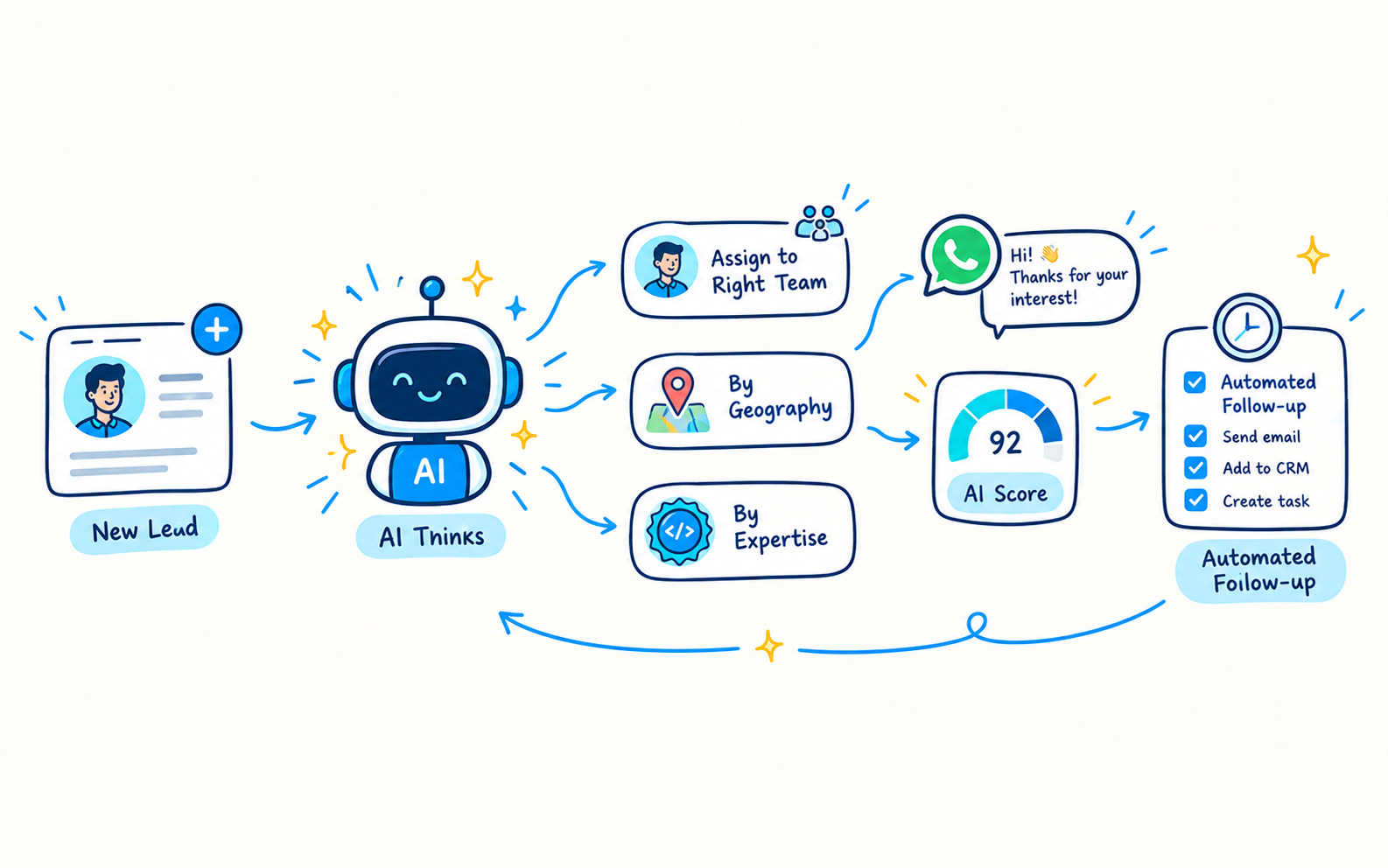
A simple automation flow in LeadStor can look like this:
- A lead enters the system from a supported source.
- The platform assigns the lead based on the configured workflow.
- A reminder or alert keeps the next action visible.
- The team follows up through the supported communication channel.
- The lead can be moved into nurturing if it is not ready yet.
This reduces delay and keeps the enquiry from sitting idle.
Automation patterns that make sense here
Fast routing for new enquiries
New leads should reach the right owner quickly. That is the first automation win.
Reminder-led follow-up
If a lead is not closed on the first touch, reminders help keep the next contact from being forgotten.
Nurturing for not-ready leads
Lead nurturing campaigns are useful when the lead is interested but not ready to convert today.
Communication channel support
The verified pricing data shows WhatsApp, email, and call log integrations, which gives teams practical options for follow-up.
Why this feature matters
Automation matters most when volume starts to grow. At that point, manual routing and manual reminders create delays, and delays lower response quality.
This feature helps teams:
- Move new leads faster
- Keep the next step visible
- Reduce repetitive admin work
- Keep follow-up style consistent across the team
Best use cases for this page
This feature is a good fit for:
- Teams that receive many new enquiries each day
- Counsellors who need clear next steps
- Managers who want a standard routing flow
- Education businesses that use WhatsApp or email in follow-up
- Teams that want lead nurturing without building a complex ops stack
Related pages
- Lead Capture Software
- Lead Tracking Software
- AI Sales Assistant for Lead Conversion
- Lead Conversion Software
- Lead Management Software
FAQs
Does automation replace counsellors?
No. It removes repetitive routing and reminder work, but the team still handles the human part of the conversation.
Can I still review leads manually?
Yes. The safest way to describe the feature is as support for the team, not a fully unattended sales engine.
Why does distribution matter so much?
Because a lead that reaches the right owner faster is easier to act on and less likely to go cold.
Does this page mean LeadStor has every automation feature a large enterprise suite would have?
No. It should stay aligned with the verified product content: assignment, reminders, nurturing, communication support, and workflow customisation.
Bottom line
Use this page when you want to explain how LeadStor reduces manual work without losing control of the sales process.