
Lead Management Software for Education Teams
Lead management software for education teams: centralised lead capture, tracking, automation, conversion, payments, batches, and placement workflows.
Primary focus
Lead management
One place for every stage of the journey
Best for
Education teams
Consultants, coaching institutes, and training teams
Primary focus
Lead management
One place for every stage of the journey
Best for
Education teams
Consultants, coaching institutes, and training teams
Core modules
8 features
Capture, track, automate, convert, bill, and manage outcomes
Workflow style
Connected
Sales and operations stay in the same system
Multi-channel capture
Built into the same workflow so the team does not switch tools.
Auto routing
Built into the same workflow so the team does not switch tools.
Connected operations
Built into the same workflow so the team does not switch tools.
Clear reporting
Built into the same workflow so the team does not switch tools.
LeadStor is a lead management software platform for education teams and growing businesses that want one connected system instead of a set of separate tools. It helps teams capture enquiries, assign them to the right people, keep follow-up work visible, and continue the journey into fees, batches, and placement support when needed.
If you are comparing a lead management platform, a lead management system, or general CRM software, this page gives you the full picture of how LeadStor is positioned and where the detailed feature pages fit.
Why this pillar page exists
This is the main page for the broad search intent around lead management software. It is the best starting point when you want a clear view of the platform before you read the individual feature pages.
The supporting pages go deeper into lead capture, lead tracking, automation, AI-assisted prioritisation, conversion, fees, batches, and placement support.
What the platform is designed to do
LeadStor is built to reduce handoffs between tools. For teams searching for lead management software in India, the practical question is whether the platform can hold the whole enquiry journey rather than just the first contact. LeadStor is built for education consultants, coaching institutes, and training teams that need capture, follow-up, fees, and batches to stay connected.
The verified product content in the codebase shows support for:
- Multi-channel lead capture from Facebook Lead Ads, Google Ads, Justdial, Sulekha, UrbanPro, forms, webhooks, and APIs
- Real-time lead tracking and auto assignment
- Duplicate blocking and follow-up reminders
- Lead nurturing campaigns and communication channel support
- Payments management, automated receipts, and payment reports
- Batch and attendance management
- Placement portal and student tracking
That combination matters because education teams usually need more than a contact list. They need a workflow that starts with a new enquiry and continues well after the first sale.
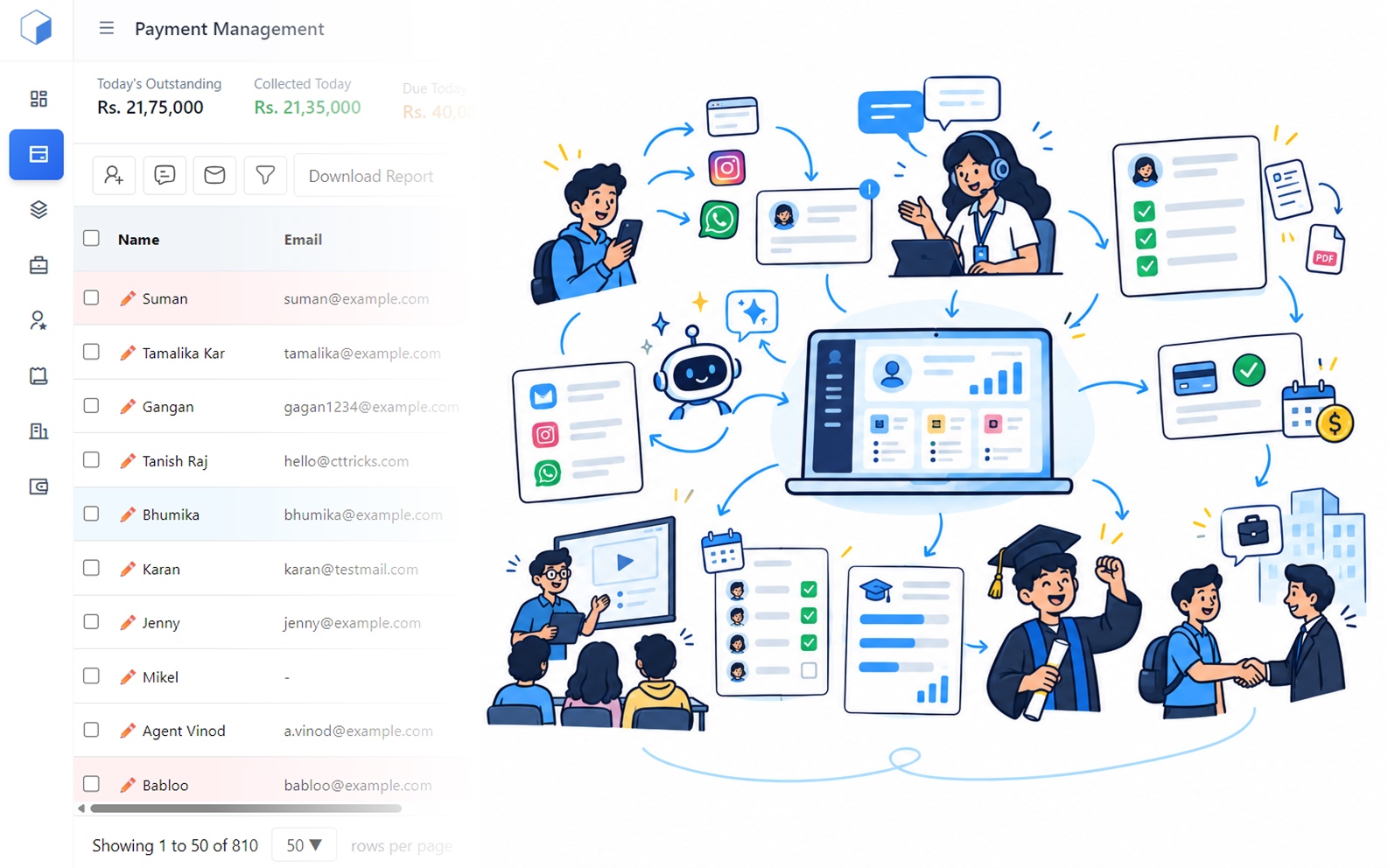
How the lead journey moves through the platform
LeadStor is most useful when the team wants the full journey to stay in one place:
- Capture the enquiry from the right source.
- Route it to the right counsellor or team member.
- Keep the lead owner, activity, and next step visible.
- Use reminders and automation to keep follow-up on time.
- Move the lead into conversion, payment, batch, or placement work without leaving the same system.
This flow gives managers a cleaner view of the pipeline and helps counsellors spend less time searching for updates.
Core capabilities inside the platform
Lead capture and source control
LeadStor centralises enquiries from ad platforms, forms, and webhooks so teams do not need to copy the same lead into multiple places. That makes the first step of the workflow cleaner and easier to manage.
Lead tracking and ownership
Once a lead enters the system, the team can keep track of ownership, history, and follow-up activity in one record. That matters for fast response times and for managers who want a clear view of who is handling what.
Automation and prioritisation
Auto assignment, duplicate blocking, reminders, and AI lead score cues help teams decide what to do next without building everything manually.
Conversion and post-sale operations
The platform is not only about first contact. It also supports the next steps that matter to education businesses, including payment management, batch management, attendance, and placement tracking.
Feature pages that support this pillar
Use these pages when you want a more specific search intent or a deeper feature explanation:
- Lead Capture Software
- Lead Tracking Software
- CRM Automation Software
- AI Sales Assistant for Lead Conversion
- Lead Conversion Software
- CRM Invoice Management
- Batch Management Software
- Placement Management Software
Who the platform fits
LeadStor is a strong fit for:
- Education consultants who handle many enquiries every day
- Coaching institutes that need lead-to-admission visibility
- Training teams that want sales and operations to stay connected
- Growing businesses that need a practical lead management system without extra tool sprawl
How to compare lead management software
When you compare platforms, look at more than the homepage promise. Check whether the software can support the full workflow:
- Can it capture leads from the channels you already use?
- Can it assign ownership quickly and keep follow-up visible?
- Can it support reminders, nurturing, and communication channels?
- Can it continue into fees, batches, and placement if your business needs that path?
If the answer is yes, the platform is closer to a real operating system for your team, not just a lead list.
When a business should start with this page
Start here if you searched for:
- Lead Management Software
- Lead Management Platform
- Lead Management System
- CRM Software
- Lead Management Software for Businesses
This page gives you the broad view first. The feature pages give you the depth.
FAQs
What is lead management software?
Lead management software helps a team capture, assign, track, and convert enquiries in one system. It keeps the lead journey visible from first contact to the next business step.
Is LeadStor only for education teams?
No. The strongest verified workflows are built around education, but the platform also fits growing businesses that need structured lead handling and follow-up.
What makes a platform page different from a feature page?
A pillar page gives the full overview. A feature page focuses on one intent, such as capture, tracking, automation, or conversion.
Does this page include post-conversion workflows?
Yes. It covers the wider platform flow, including payments, batches, attendance, and placement support where those modules apply.
How do the supporting pages help SEO?
They let the pillar page own the broad keyword while each feature page targets a narrower search intent. That helps avoid keyword cannibalisation and makes the topic structure clearer.
Start here
If you want the broad view of LeadStor, this is the right place to begin. Read the feature pages next to understand how the platform handles each stage of the journey.